Sending a simulation to a remote node
A simulation can run on another machine, a node, when its Compute request
names one: a workstation with a GPU, a server, the NAS under the desk. The run
record, FDTDRun or ElasticRun, is the one a run here takes, built and
checked here; the call is the same, fdtd_simulation(run, compute=...) or
elastic_fdtd_simulation(run, compute=...); and so is the record it returns.
Only those two functions, and the two video writers that take the same runs,
write_fdtd_animation and write_elastic_fdtd_animation, go to a node. An
engine built directly, FDTD2D or ElasticFDTD2D, steps in this process,
where its fields are yours to read and write between steps, and it refuses a
request that names a host.
This page says what happens when a run goes to a node, how to name one, how to set up a Docker node or a Python node, what can go wrong and what each error says, how to follow a run, what each side trusts of the other, and when a run there gives the numbers a run here gives. The device itself, NumPy, CuPy or torch, is chosen as Where a simulation runs explains, and it holds on a node that has that library: section 3 says what the image holds, and section 4 what a Python node needs. Where heavy work runs maps the devices, the nodes and the encoders in one place.
1. What happens when a run goes to a node
Section titled “1. What happens when a run goes to a node”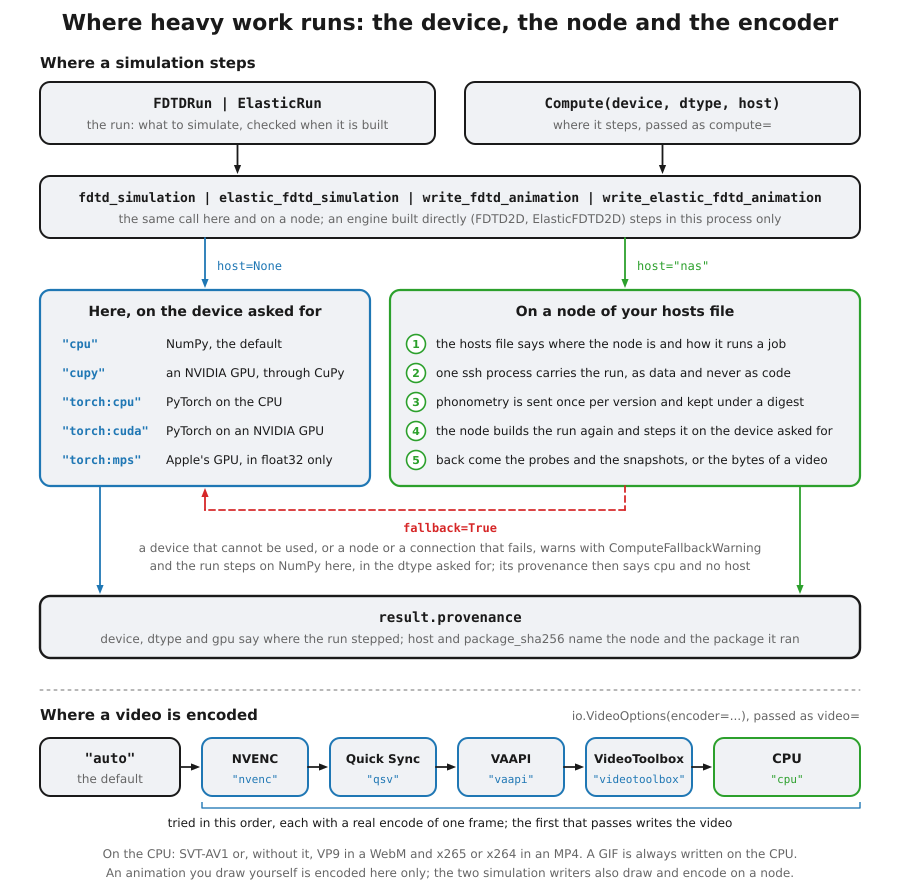
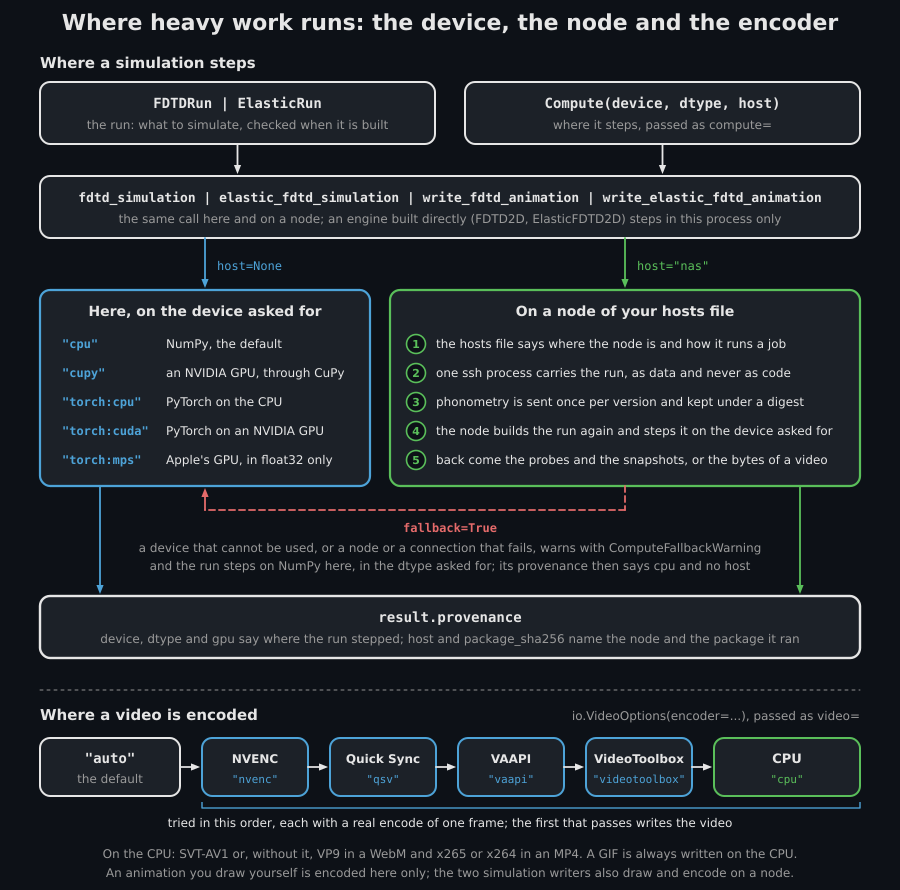
The map of Where heavy work runs. This section walks its right-hand branch, the numbered steps and the provenance they end in; the dashed arrow is the fallback of section 5.
Everything that can refuse the call does so here first, before a connection
opens. The run checked every argument when it was built, by the code a run
here uses, so a wrong argument raises the TypeError or ValueError it
raises without a host. The function then refuses a run that cannot travel
(section 5 says which), and the hosts file must name the node.
Then one ssh process carries the whole run. There is no server to install
or keep running on the node: its ssh server is all it needs. This machine
needs phonometry and an OpenSSH client, and no CuPy, torch, ffmpeg or
matplotlib: a run that falls back steps on NumPy, and only a video writer that
falls back needs ffmpeg and matplotlib here. The run travels as data, field by
field, never as code, and the node builds it again with the library’s
constructors, so it checks itself again there. The video writers travel too,
called as write_fdtd_animation(path, run, compute=...), their run, frame and
video options as records: see section 5 of
Writing animations and FDTD runs to video.
The node runs your own phonometry, as installed here, whatever is installed there. The client sends its files, those a wheel of it would hold, once per version: a node keeps each version under a digest of its files, which it computes again from what it receives, and a development checkout is a new version at each change. A node keeps the five packages used last and prunes the others, but never one used in the last ten minutes or one a run still holds, so a long run keeps its package however many others come and go.
The node runs the function on the device asked for, with no fallback of its
own, and sends back the probe histories and, when the run records them
(snapshot_every of its FDTDRecording or ElasticRecording), the
snapshots, which are read here into arrays sized from your request and
allocated before the connection opens. On a large grid the snapshots are most
of what crosses the link and of the memory this machine needs:
snapshot_decimation, section 7 of
Where a simulation runs, and
dtype="float32" shrink them, while the probe histories stay float64. A video
writer sends its video’s bytes instead of snapshots.
result.provenance.host names the node and
result.provenance.package_sha256 the package that ran, and
result.provenance.phonometry_version is your own version, which the job
carries: from its cache the node cannot name the package it runs.
device_index is the one you asked for, and the rest of the provenance is the
node’s: its NumPy, its array library, its CUDA, its GPU. Section 5 of
Where a simulation runs lists every field.
2. Naming a node: the hosts file
Section titled “2. Naming a node: the hosts file”A request names a node by a name of your choosing, and a hosts file says where that node is and how it runs a job. The file is read each time a run names a host, never at import:
| System | Where the hosts file is |
|---|---|
| Linux and macOS | ~/.config/phonometry/hosts.toml, or phonometry/hosts.toml under the directory XDG_CONFIG_HOME names, when that variable holds an absolute path |
| Windows | %APPDATA%\phonometry\hosts.toml |
| any system | the path PHONOMETRY_HOSTS_FILE names, when that variable is set; it wins over the rows above |
Each node is a table of its own. This file names a Docker node and a Python node:
# A GPU in the NAS, running the node image (section 3).[hosts.nas]ssh = "me@nas.local"runner = "docker"image = "phonometry-node:gpu"label = "the GPU in the NAS"timeout_s = 7200
# A workstation running a Python environment of its own (section 4).[hosts.lab]ssh = "lab" # a Host alias of ~/.ssh/configrunner = "python"python = "venvs/node/bin/python" # relative to the home directory there| Key | What it holds | Default |
|---|---|---|
ssh |
the destination ssh takes: user@address, or a Host alias of your ~/.ssh/config |
required |
runner |
how the node runs a job: "docker" or "python" |
required |
image |
for a Docker node, the image on the node | required there |
python |
for a Python node, its interpreter: an absolute path, a path relative to the home directory on the node, or a program name such as python3, found on the PATH the command ssh runs there sees |
required there |
label |
how messages and the log name the node | its name |
timeout_s |
the longest a run there may take, in seconds | no limit |
A name holds up to 64 characters, each a letter, a digit, ., _ or -, and
starts with a letter or a digit. A name with a dot goes in quotes in its
table’s header, because TOML reads a bare dot as a table inside another:
[hosts."nas.local"] names the node nas.local, which
Compute(host="nas.local") asks for, where [hosts.nas.local] would be a
table local inside a node nas. A key the table does not list, an image
for a Python node or a python for a Docker one, or a python path that
starts with ~ raises ValueError naming the file: the client quotes the
path in the command it sends, so the node’s shell would never expand the ~.
A file saved with a byte-order mark, as Windows Notepad saves UTF-8, reads
like any other.
What ssh needs. The client runs the ssh of your machine, OpenSSH 7.6 or
newer, and a run never asks for anything: ssh runs in batch mode. It is the
ssh on PATH, run by the full path found there. On Windows, which looks for
a program in the working directory before PATH, an ssh there gives way to
the one on PATH, and one found only there is refused with a
ComputeRemoteError: put an OpenSSH client on PATH. Found in a working
directory that PATH itself lists, it runs as found. On Windows ssh also
starts with no console window, so a run from a notebook or from pythonw
opens none. Log in to the node with a key ssh can use without a prompt, from
ssh-agent or with no passphrase, and connect once by hand to accept the
node’s host key. A user, a port, a key or a jump host belongs in a Host
alias of ~/.ssh/config. The options the client gives ssh on the command
line win over that file for what
a run cannot have: a RemoteCommand or a LocalCommand of the alias does
not run, nothing is forwarded (section 7), and no connection is shared:
every run is a connection of its own, whatever ControlMaster the alias
sets. Three settings stay the file’s, because clients older than OpenSSH 8.7
refuse them on the command line, and an alias used as a node must leave them
at their defaults: SessionType none hangs a run until its timeout,
StdinNull yes fails it at once, and ForkAfterAuthentication yes detaches
the session out of the client’s reach.
The request. host names the node, and timeout_s may bound the run; it
wins over the file’s. Building the request reads no file and opens no
connection:
from phonometry import simulation
request = simulation.Compute(device="cupy", host="nas", timeout_s=3600)print(request.host, request.timeout_s)   # nas 3600.0
The run and the call are those of a run here:
run = simulation.FDTDRun( c=343.0, dx=0.01, duration_s=0.05, shape=(400, 600), sources=[simulation.GaussianPulse(ix=150, iy=200, half_width_s=3.0e-4)], recording=simulation.FDTDRecording(probes=[(450, 200)]),)res = simulation.fdtd_simulation(run, compute=request)print(res.provenance.host, res.provenance.gpu) # nas, and the card's nameelastic_fdtd_simulation(ElasticRun(...), compute=request) goes to the node
the same way. A whole script can name the node once, with a
simulation.use() block or with the PHONOMETRY_COMPUTE environment
variable; section 3 of
Where a simulation runs says which wins
when more than one names a placement. A use() block holds its request for
every call inside it that passes no compute=:
with simulation.use(request): res = simulation.fdtd_simulation(run)The variable’s grammar is device[:index][@host][,option...]. It has no
timeout_s option, so a run it sends to a node takes the hosts file’s
timeout_s, when the file gives one:
PHONOMETRY_COMPUTE=cupy@nas python study.pyPHONOMETRY_COMPUTE=cupy:1@nas,float32,fallback python study.pyA host is a name from the file, never user@address: the destination belongs
in the file, and Compute(host="me@nas") raises ValueError. An engine built
directly refuses a host wherever it comes from, a use() block and the
variable included, and its ValueError says what to pass instead: compute=
naming only the device, to step here, or the run to its simulation function,
to run the whole simulation there.
3. A Docker node
Section titled “3. A Docker node”A Docker node is a Linux machine whose login shell is a POSIX shell (sh,
bash, zsh: the command a client sends is quoted for one), with Docker
installed and your user in its docker group. A run on a node where your user
is not in that group fails, and its error gives the command that adds you. A
GPU needs the NVIDIA driver on the node as well, recent enough for the CUDA
runtime of the image, and the NVIDIA Container Toolkit.
Membership of the docker group is the same as root on the node: the
Docker daemon runs as root, and any member can start a container that reads
and writes every file of the machine, as Docker’s own documentation warns.
The node’s owner gives that membership only to an SSH account already
trusted with the whole machine.
A node may run Docker without root instead (rootless Docker), or Podman as your
user (rootless Podman) behind a docker command; Podman run as root counts as
Docker run as root. A daemon run by you needs no docker group and runs the
container’s root as you, while any other user id inside, yours and one an image
names with USER among them, becomes one of its subordinate ids, which cannot
write the cache: the client asks the daemon, through docker info, which kind
it is, and on one run by you starts the container as its root, with
--user=0:0. Every run also passes --userns=host, which keeps the container
in the node’s own user namespace: under a daemon that remaps user ids the
container would otherwise run as a subordinate id, which cannot write the cache
under Docker’s userns-remap and, under a Podman set to userns = "keep-id",
leaves files there that you cannot remove. The docker command of a
non-interactive SSH session has to reach that daemon, which a context set with
docker context use does.
The image is built on the node, from a checkout of the repository on your machine:
make node-image HOST=nas # a node with an NVIDIA GPUmake node-image HOST=nas TARGET=cpu # a node without oneHOST names an entry of your hosts file whose runner is docker. The command
sends the Dockerfile, docker/node/Dockerfile, and the few files it copies to
the node over ssh, docker build runs there, and the image takes the entry’s
image as its tag. Nothing is published to a registry, and a rebuild with
nothing changed comes from Docker’s cache.
Both builds hold Python 3.13 with the library’s pinned dependencies and the libraries its figures need, the DejaVu fonts the figures are drawn with, and ffmpeg, a static build the Dockerfile pins by URL and SHA-256, with SVT-AV1, NVENC, VP9 and dav1d, so a node needs no ffmpeg of its own. The GPU build adds the CUDA runtime and CuPy 14.2.0, the release the GPU proof of Where a simulation runs ran on. Neither build holds torch, and the CPU build holds no CuPy: a torch device takes a Python node or an image of your own. Each base image is pinned by digest.
Each run gets a container of its own, removed when the run ends, with no
network, running as your user on the node, so whatever it writes is yours. Its
packages live in ~/.cache/phonometry/remote on the node (under
XDG_CACHE_HOME when that variable holds an absolute path), which the
container mounts, with the kernels CuPy compiles under cupy-kernels there,
so a later run does not compile them again. A run takes one GPU, the one device_index picks. Docker
never pulls the image: a node without it fails the run, and the error says to
build it.
The hosts file may name an image of your own. The client runs the bootstrap a
node starts with as the container’s entrypoint, python on the image’s PATH
running /usr/local/share/phonometry-node/bootstrap.py, so such an image needs
a python on its PATH and that file at that path (the Dockerfile copies it
from the package), with Python, NumPy and SciPy at the floors of section 4,
and CuPy or torch for a GPU. Its own ENTRYPOINT does not run: nothing it
would print can break the conversation with the client, and an environment it
would activate is not active.
4. A Python node
Section titled “4. A Python node”A Python node runs a job in a Python environment of its own, with no Docker.
It is a Linux or macOS machine whose login shell is a POSIX shell, as for
Docker. Windows works as the client, not as a node: its OpenSSH server runs
the command through cmd.exe, which reads the quoting another way.
The environment needs Python 3.12 or later, with NumPy 2.0.2 or later and
SciPy 1.14.0 or later, the library’s floors on its oldest Python, which the
node checks whatever its own, and CuPy or torch for a GPU,
installed as Where a simulation runs says.
phonometry need not be installed there, and an installed one is not used: the
interpreter runs isolated (-I), on the package the client sent, and the node
checks that the phonometry it imported is that one. An environment below a
floor refuses the run, and the error names the floor and says to upgrade the
environment.
python3 -m venv ~/venvs/node~/venvs/node/bin/pip install "numpy>=2.0.2" "scipy>=1.14.0"Quote each requirement: unquoted, the >= is a shell redirection. The hosts
file then names the interpreter by its path, venvs/node/bin/python from the
home directory or the absolute path. The client runs that python directly,
with no activation script first, so the environment must work without one.
A node that writes videos
(Writing animations and FDTD runs to video) needs two things more:
matplotlib in that environment, 3.10.7 or later as the library’s plot
extra asks (~/venvs/node/bin/pip install "matplotlib>=3.10.7"), and ffmpeg
on the PATH the command ssh runs there sees. The Docker image of section 3
holds both.
5. When something goes wrong
Section titled “5. When something goes wrong”| What went wrong | What is raised | When |
|---|---|---|
| an argument of the run | TypeError or ValueError |
when the run is built, as for a run here |
a run that cannot travel: a source whose waveform is a callable other than the .value of a GaussianPulse, CWSource or SignalSource, a subclass of one of the library’s records, a whole number outside the range of an int64, a number or an array of floats wider than 64 bits (a longdouble), or a Fraction or a Decimal the run keeps as given, such as dx=Fraction(1, 100) |
TypeError, naming the source or the field |
when the function is called, before the hosts file is read |
| a host the file does not name, or no hosts file | KeyError |
before ssh starts |
| a hosts file that is a named pipe, a device or a directory, holds more than 1 MiB, cannot be read or is not TOML, or a malformed entry | ValueError, naming the file |
before ssh starts |
no ssh client on PATH, even on Windows with one in the working directory, Pyodide, a package that cannot be read from disk or holds a file no node would write, or a job too long for the header a node reads (a run of several thousand point sources) |
ComputeRemoteError |
before ssh starts |
| anything that fails in the connection or on the node | ComputeRemoteError |
when it fails |
The message of a ComputeRemoteError says what happened and, when it can
tell, what to do: install an OpenSSH client here, build the image on the node
(make node-image HOST=nas),
join the docker group there, install the NVIDIA Container Toolkit, lift the
environment to the floors or rebuild the image, add your key to the node’s
~/.ssh/authorized_keys, accept its host key, make a login script print
nothing when the shell is not interactive, or rename a file of a development
checkout whose name no node would write. Its host holds the node’s name, and
its node_traceback the traceback the node printed when the run raised
there, which is also attached as a note, so a traceback printed here shows
it. A connection that broke adds the last lines the node wrote to its
standard error as a note too.
With fallback=True a ComputeRemoteError becomes a ComputeFallbackWarning,
whose message carries the error, and the run steps on NumPy here, in the dtype
asked for; its provenance says so, with no host and the device "cpu". A
video writer that falls back also draws and encodes here, so it needs ffmpeg
and matplotlib on this machine: without matplotlib it raises ImportError,
and without ffmpeg io.FFmpegNotFoundError. Every ComputeRemoteError falls
back, those raised here before ssh starts included; a wrong argument, a run
that cannot travel, an unknown host or a malformed hosts file raises with or
without it.
Warnings the run raises on the node are raised here, at the line of your code
that called the function, with their own class: phonometry’s as published,
Python’s and NumPy’s as themselves. A warning of a library this process has
not imported, or of a class that cannot be built from its message, comes back
as the warning class of Python’s own that its class derives from, a
UserWarning, a DeprecationWarning or a RuntimeWarning among them, with a
message that starts with the class’s path: a filter on that class reaches it
here as it would on the node. A warning class of Python’s own that only a
later Python on the node has comes back as a RuntimeWarning, its message
still led by the class’s path.
An interrupt, Ctrl-C or the stop button of a notebook, stops ssh at once and
reaches your code as KeyboardInterrupt, fallback=True or not. The node
sees its input end, and its run ends at most 30 seconds after its client
closes the connection, usually at its next step. A client that vanishes
without closing it (a laptop put to sleep, a network that drops) is noticed
only when the node’s ssh server notices. Set its keep-alive in the node’s
sshd_config, to the values the client’s own keep-alive uses, and reload the
server:
ClientAliveInterval 15ClientAliveCountMax 4With them the server notices a vanished client in about a minute. Without them the run goes on to its end, and a GPU stays busy for it.
6. Progress and timeouts
Section titled “6. Progress and timeouts”A remote run reports to the phonometry.simulation logger, which says nothing
until you configure logging:
import logging
logging.basicConfig(level=logging.INFO)
At INFO the logger says when a run starts, when the package is sent (its
digest and its size), the step the node has reached as the run goes, and when
the run is done, each line led by the node’s label; at DEBUG it adds what
the node writes to its standard error.
timeout_s, from the request or else from the hosts file, bounds a whole run,
from connecting to the result, measured here: past it ssh is stopped and the
run raises ComputeRemoteError, or falls back with fallback=True. Without
one a run may take as long as it takes. Two bounds hold whatever it says: ssh
notices a dead connection in about a minute, and gives up connecting after
30 seconds.
7. Security, in both directions
Section titled “7. Security, in both directions”SSH is the boundary. Whoever can log in to the node can run code there, and a
remote run does exactly that with the package you send, so give the node the
trust you give any machine you log in to. ssh is started with no terminal,
with no agent, X11 or port forwarding, and without delegating your Kerberos
credentials, whatever ~/.ssh/config says for the host. Besides the package
and the job, it may send the environment variables your ssh configuration
names with SendEnv or SetEnv (on Debian and Ubuntu, for example LANG and
the LC_* variables), as far as the node’s AcceptEnv allows.
A job carries no code: the node runs the package you sent, on its own Python and libraries. The job names one of the two simulation functions or of the two video writers and carries its run as data, which the node builds again with the library’s constructors, and a package is checked against its digest before it is stored. A Docker node’s container has no network.
The client does not trust the bytes the node sends. Every header and every array is checked against what the request implies, its name, its dtype, its shape and its length, before it is read; nothing is unpickled; no module the node names is imported unless it is phonometry’s own; and the node’s words (its errors, tracebacks, log lines and warnings) reach your terminal with their control characters written as escapes, so a node cannot send an escape sequence to your terminal.
8. When a run there equals a run here
Section titled “8. When a run there equals a run here”A run on a node steps the same code as a run here, on the node’s own NumPy and its own CPU or GPU. On a CPU it gives the same numbers bit for bit only with the same pins on the same CPU: the same Python, NumPy and SciPy, on the same kind of processor and C library. A CI job proves it on every pull request, against a node on the same machine. Between two machines, NumPy’s vectorised functions, such as the exponential of the sponge profile, may round differently by one unit in the last place, each CPU taking the instructions it has. On a GPU, Where a simulation runs states what the proof on the GPU shows.
9. For library developers
Section titled “9. For library developers”The remote route’s tests run on every pull request through a stand-in for
ssh, on Linux, macOS and Windows, and a CI job runs a real node on localhost:
it builds the node image for a CPU, serves it through an ssh server and holds
a run there bit for bit to the run here. make node-image HOST=<name> builds
the image on your node from your checkout, with the Dockerfile and the
bootstrap as you changed them. After a change to an engine, make gpu-parity,
run from your checkout in that image on the node’s GPU, renews the GPU proof
in gpu-parity.lock.
Rendering the documentation clips on a node
Section titled “Rendering the documentation clips on a node”The documentation’s animated clips, most of them simulations stepped on the
engines of this page, can be rendered on the same node: with the node in the
hosts file, PHONOMETRY_COMPUTE=cupy@<name> make animations sends the
repository’s committed code there, renders the clips two at a time with the
GPU and NVENC, and brings them back checked. The
contributing guide
explains it, and how to render them here on a CPU, which gives clips fit to
publish too.
What this guide covers
Section titled “What this guide covers”Covered
Running
fdtd_simulation,elastic_fdtd_simulationand the two video writers,write_fdtd_animationandwrite_elastic_fdtd_animation, on another machine over SSH, on a Docker node running the image built from the repository’s Dockerfile or on a Python environment, with or without a GPU; the hosts file that names a node, and thehostofComputeand ofPHONOMETRY_COMPUTE; what the client and the node check, each of what the other sends; the errors a remote run raises, the fallback to NumPy here, the warnings the node raises, progress on thephonometry.simulationlogger, timeouts and interrupts; and when a remote run gives the numbers of a run here.Not covered
An engine built directly,
FDTD2DorElasticFDTD2D, steps in this process and does not go to a node, and a node runs the two simulation functions and the two video writers only, never code of the caller’s choosing. ssh is the only transport. A node has no scheduler or queue of its own: two runs sent at the same time run side by side. The node image is built on the node and published to no registry, and a Windows machine cannot be a node. A node encodes the video of a run it steps, but no animation drawn here:io.write_videoruns on this machine only.
Quick answers
Section titled “Quick answers”How do I run a simulation on another machine?
Section titled “How do I run a simulation on another machine?”Name the machine in a hosts file, give it the node image
(make node-image HOST=nas) or a Python environment with NumPy, SciPy and,
for this GPU request, CuPy, and pass
compute=simulation.Compute(device="cupy", host="nas") to fdtd_simulation
or elastic_fdtd_simulation, or set PHONOMETRY_COMPUTE=cupy@nas. The run,
the call and the result are those of a run here, and result.provenance.host
names the node.
Does a remote run give the same numbers?
Section titled “Does a remote run give the same numbers?”With the same pins on the same CPU, bit for bit, as a CI job proves on every pull request. Between two machines, NumPy may round a vectorised function, such as the exponential of the sponge profile, differently by one unit in the last place. On a GPU, the proof on the compute page states how the fields compare with NumPy’s.
What does the node need?
Section titled “What does the node need?”An ssh server you can log in to with a key, on Linux or macOS with a POSIX
login shell, and either Docker with the node image (and, for a GPU, the NVIDIA
driver and the NVIDIA Container Toolkit) or a Python 3.12 or later with NumPy
and SciPy at the library’s floors (and CuPy or torch for a GPU). To write
videos, a Python node also needs matplotlib, and ffmpeg on its PATH; the
Docker image holds both. phonometry itself need not be installed there: the
client sends its own. This machine needs phonometry and an OpenSSH client, and
no CuPy, torch, ffmpeg or matplotlib: a run that falls back steps on NumPy,
and only a video writer that falls back needs ffmpeg and matplotlib here.